
Introduction
You know Magento allows to have mass action on the selected grid listing items.
The purpose of mass action is obvious that it allows having the mass/bulk operation on the selected rows at once. Some popular mass action is: Delete, Update Status, etc.
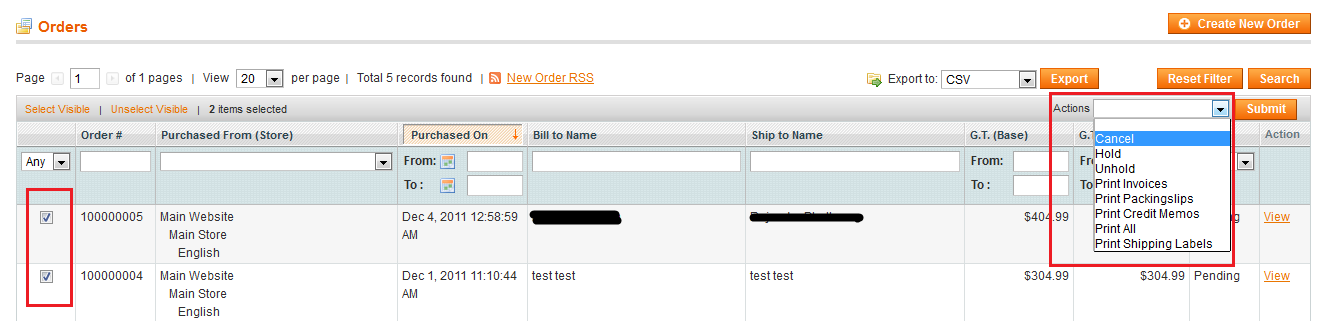
This is often a requirement that you may need to add new mass action to sales, customer, products, etc. So here I will be sharing the different ways for adding new mass action:
1. By Extending the Admin Grid:
For example purpose, we will be using the Sales Order Grid.
1.1 Use the following code in config.xml of your module (for example: app/code/local/MagePsycho/Newmodule/etc)
...
<global>
	<blocks>
		<adminhtml>
			<rewrite>
				<sales_order_grid>MagePsycho_Newmodule_Block_Sales_Order_Grid</sales_order_grid>
			</rewrite>
		</adminhtml>
	</blocks>
</global>
...
1.2 Create a file: app/code/local/MagePsycho/Newmodule/Block/Sales/Order/Grid.php and paste the following code:
<?php
class MagePsycho_Newmodule_Block_Sales_Order_Grid extends Mage_Adminhtml_Block_Sales_Order_Grid
{
	protected function _prepareMassaction()
    {
        parent::_prepareMassaction();

        // Append new mass action option
        $this->getMassactionBlock()->addItem(
      		'newmodule',
            array('label' => $this->__('New Mass Action Title'),
				  'url'   => $this->getUrl('newmodule/controller/action') //this should be the url where there will be mass operation
			)
        );
    }
}
1.3 That’s all. This will show up the new mass action in the drop-down of Sales > Order Grid.
Note: One of the major drawbacks of this feature is the compatibility issue with other extensions which is extending the same Sales Order Grid class.
2. Using event: core_block_abstract_prepare_layout_before
2.1 Use the following XML code in config.xml:
<adminhtml>
	...
	<events>
		<core_block_abstract_prepare_layout_before>
			<observers>
				<newmodule_core_block_abstract_prepare_layout_before>
					<class>newmodule/observer</class>
					<method>addMassAction</method>
				</newmodule_core_block_abstract_prepare_layout_before>
			</observers>
		</core_block_abstract_prepare_layout_before>
	</events>
	...
</adminhtml>
2.2 Create a Model file: app/code/local/MagePsycho/Newmodule/Model/Observer.php and paste the following code:
<?php
class MagePsycho_Newmodule_Model_Observer
{
    public function addMassAction($observer)
    {
        $block = $observer->getEvent()->getBlock();
        if(get_class($block) =='Mage_Adminhtml_Block_Widget_Grid_Massaction'
            && $block->getRequest()->getControllerName() == 'sales_order')
        {
            $block->addItem('newmodule', array(
                'label' => 'New Mass Action Title',
                'url' => Mage::app()->getStore()->getUrl('newmodule/controller/action'),
            ));
        }
    }
}
2.3 That’s all.
Note: This is more upgrade proof method because we are not extending any core class but using an event-observer method.
It’s always a best practice to use event-observer method whenever/wherever possible.
Lastly, this is not the full working code, we have only tried to show how to add new mass action to the grid. The main mass operation on the selected items should be done in controller level which has been skipped from this article and can try of your own.
Thanks for reading.
Happy Coding!