
Introduction
Recently I have to fix a strange issue for one of my clients. The issue was that product images were missing from ‘Images’ tab of product edit form (as depicted below), though they were displaying fine in the frontend.

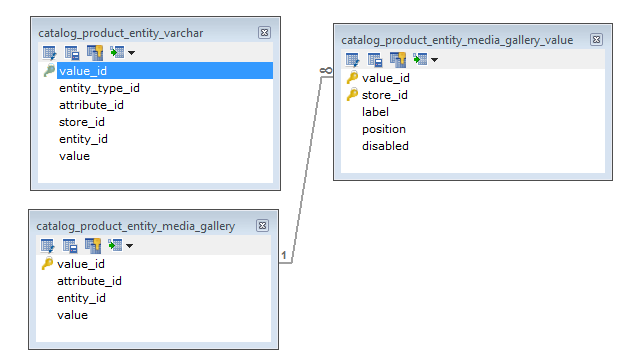
After going through the table relationship for catalog product images (as shown below), it was found that required rows were missing in table ‘catalog_product_entity_media_gallery’. Note that the table ‘catalog_product_entity_media_gallery_value’ is not necessary unless you want to sort or label the product images.
By inspecting the HTML code of Images tab of product edit form via firebug, it was seen that ‘value’ attribute had empty JSON:
<input type="hidden" value="[]" name="product[media_gallery][images]" id="media_gallery_content_save">Further Debugging:
Using template path hints extension for admin: Easy Template Path Hints, it was found that the responsible template and block class were: ‘app/design/adminhtml/default/default/template/catalog/product/helper/gallery.phtml’ and ‘Mage_Adminhtml_Block_Catalog_Product_Helper_Form_Gallery_Content’ respectively.
Looking at the block class and .phtml code it was found that Input element has empty json because of Mage_Adminhtml_Block_Catalog_Product_Helper_Form_Gallery_Content::getImagesJson() method.
When populated the images from table ‘catalog_product_entity_varchar’ to ‘catalog_product_entity_media_gallery’ for those products, products images were seen at the backend(refer to the code below for more info).
Here go the steps for fixing:
Steps
1> Prepare CSV file(update_missing_images.csv) with only one field: SKU and upload to the root of Magento installation.
Note: This will contain the SKU of those products whose images are missing at the backend.
2> Create a file: update_missing_images.php and upload to the root of Magento installation and paste the following code:
<?php
/**
 * @author		MagePsycho <[email protected]>
 * @website		https://www.magepsycho.com
 * @category	Export / Import
 */
$mageFilename = 'app/Mage.php';
require_once $mageFilename;
Mage::setIsDeveloperMode(true);
ini_set('display_errors', 1);
umask(0);
Mage::app('admin');
Mage::register('isSecureArea', 1);
Mage::app()->setCurrentStore(Mage_Core_Model_App::ADMIN_STORE_ID);

set_time_limit(0);
ini_set('memory_limit','1024M');

/***************** UTILITY FUNCTIONS ********************/
function _log($message, $file = 'update_missing_images.log'){
	Mage::log($message, null, $file);
}

function _getIndex($field) {
	global $fields;
	$result = array_search($field, $fields);
	if($result === false){
		$result = -1;
	}
	return $result;
}

function _getConnection($type = 'core_read'){
	return Mage::getSingleton('core/resource')->getConnection($type);
}

function _getTableName($tableName){
	return Mage::getSingleton('core/resource')->getTableName($tableName);
}

function _getAttributeId($attribute_code = 'price'){
	$connection = _getConnection('core_read');
	$sql = "SELECT attribute_id
				FROM " . _getTableName('eav_attribute') . "
			WHERE
				entity_type_id = ?
				AND attribute_code = ?";
	$entity_type_id = _getEntityTypeId();
	return $connection->fetchOne($sql, array($entity_type_id, $attribute_code));
}

function _getEntityTypeId($entity_type_code = 'catalog_product'){
	$connection = _getConnection('core_read');
	$sql		= "SELECT entity_type_id FROM " . _getTableName('eav_entity_type') . " WHERE entity_type_code = ?";
	return $connection->fetchOne($sql, array($entity_type_code));
}

function _getIdFromSku($sku){
	$connection = _getConnection('core_read');
	$sql		= "SELECT entity_id FROM " . _getTableName('catalog_product_entity') . " WHERE sku = ?";
	return $connection->fetchOne($sql, array($sku));
}

function _checkIfSkuExists($sku){
	$connection = _getConnection('core_read');
	$sql		= "SELECT COUNT(*) AS count_no FROM " . _getTableName('catalog_product_entity') . "	WHERE sku = ?";
	$count		= $connection->fetchOne($sql, array($sku));
	if($count > 0){
		return true;
	}else{
		return false;
	}
}

function _checkIfRowExists($productId, $attributeId, $value){
	$tableName  = _getTableName('catalog_product_entity_media_gallery');
	$connection = _getConnection('core_read');
	$sql		= "SELECT COUNT(*) AS count_no FROM " . _getTableName($tableName) . " WHERE entity_id = ? AND attribute_id = ?  AND value = ?";
	$count		= $connection->fetchOne($sql, array($productId, $attributeId, $value));
	if($count > 0){
		return true;
	}else{
		return false;
	}
}

function _insertRow($productId, $attributeId, $value){
	$connection				= _getConnection('core_write');
	$tableName				= _getTableName('catalog_product_entity_media_gallery');

	$sql = "INSERT INTO " . $tableName . " (attribute_id, entity_id, value) VALUES (?, ?, ?)";
	$connection->query($sql, array($attributeId, $productId, $value));
}

function _updateMissingImages($count, $productId, $data){
	$connection				= _getConnection('core_read');
	$smallImageId			= _getAttributeId('small_image');
	$imageId				= _getAttributeId('image');
	$thumbnailId			= _getAttributeId('thumbnail');
	$mediaGalleryId			= _getAttributeId('media_gallery');

	//getting small, base, thumbnail images from catalog_product_entity_varchar for a product
	$sql	= "SELECT * FROM " . _getTableName('catalog_product_entity_varchar') . " WHERE attribute_id IN (?, ?, ?) AND entity_id = ? AND `value` != 'no_selection'";
	$rows	= $connection->fetchAll($sql, array($imageId, $smallImageId, $thumbnailId, $productId));
	if(!empty($rows)){
		foreach($rows as $_image){
			//check if that images exist in catalog_product_entity_media_gallery table or not
			if(!_checkIfRowExists($productId, $mediaGalleryId, $_image['value'])){
				//insert that image in catalog_product_entity_media_gallery if it doesn't exist
				_insertRow($productId, $mediaGalleryId, $_image['value']);
				/* Output / Logs */
				$missingImageUpdates = $count . '> Updated:: $productId=' . $productId . ', $image=' . $_image['value'];
				echo $missingImageUpdates.'<br />';
				_log($missingImageUpdates);
			}
		}
		$separator = str_repeat('=', 100);
		_log($separator);
		echo $separator . '<br />';
	}
}
/***************** UTILITY FUNCTIONS ********************/

$messages			= array();
$csv				= new Varien_File_Csv();
$data				= $csv->getData('update_missing_images.csv'); //path to csv
$fields				= array_shift($data);
#print_r($fields); print_r($data); exit;

$message = '<hr />';
$count   = 1;
foreach($data as $_data){
	$sku									= isset($_data[_getIndex('sku')]) ? trim($_data[_getIndex('sku')]) : '';
	if(_checkIfSkuExists($sku)){
		try{
			$productId = _getIdFromSku($sku);
			_updateMissingImages($count, $productId, $_data);
			$message .= $count . '> Success:: While Updating Images of Sku (' . $sku . '). <br />';

		}catch(Exception $e){
			$message .=  $count .'> Error:: While Upating Images of Sku (' . $sku . ') => '.$e->getMessage().'<br />';
		}
	}else{
		$message .=  $count .'> Error:: Product with Sku (' . $sku . ') does\'t exist.<br />';
	}
	$count++;
}
echo $message;
3> Open your browser and run the following URL:
http://your-magento-url/update_missing_images.php
4> That’s all. Try to browse the Images tab, now you will see those missing images.
Hope this helps somebody!