
A rich text editor(TinyMCE) is an often requirement for Admin Module as it makes the content editing work much easier.
In order to enable TinyMCE editor in textarea field, You need to do the following two things:
1> Including TinyMCE in Head
Add the following function in your Adminhtml Edit Class (MagePsycho_Demomodule_Block_Adminhtml_Demomodule_Edit):
protected function _prepareLayout() {
parent::_prepareLayout();
if (Mage::getSingleton('cms/wysiwyg_config')->isEnabled()) {
$this->getLayout()->getBlock('head')->setCanLoadTinyMce(true);
}
}
2> Enabling in Form Field
Add the following content field in your Adminhtml Form class (MagePsycho_Demomodule_Block_Adminhtml_Demomodule_Edit_Tab_Form):
$fieldset->addField('content', 'editor', array(
'name' => 'content',
'label' => Mage::helper('demomodule')->__('Content'),
'title' => Mage::helper('demomodule')->__('Content'),
'style' => 'height:15em',
'config' => Mage::getSingleton('cms/wysiwyg_config')->getConfig(),
'wysiwyg' => true,
'required' => false,
));
Note: Field Type must be ‘editor’ and ‘wysiwyg’ must be true
3> That’s All.
Here is what it looks like when loaded:
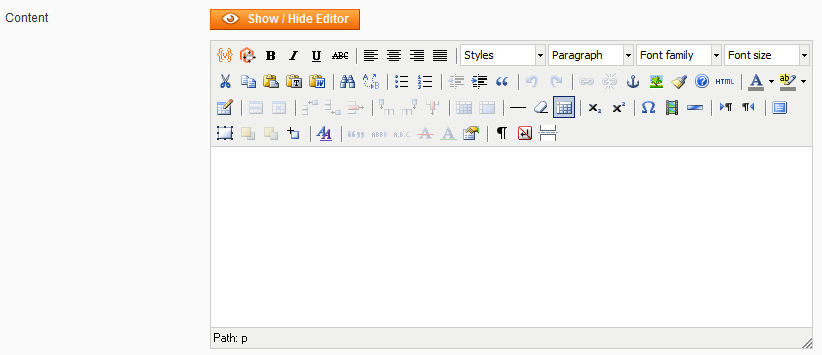
Note that this code was tested in Magento Version 1.6.1.0
Happy Editing!
Hi there,
I’m just in the process of setting up an extensive module (content wise) to enable clients to first fill out and second, be able to change information in header, footer, trans. emails, invoices etc etc.
The module is very basic and all the tabs, groups and fields are declared in the system.xml. I would love to be able to make some of those fields to be textareas with wysiwyg enabled.
How would the stuff you have explained above, relate to the declaring of the same field in xml? Is it the same old magento style from the front end; the block is made available as a wysiwyg by the above and the xml draws it out on the page?
Or even better, and probably not realistic, is there a way to declare the same in xml directly?
Much appreciation for an answer to this.
All the best
Peter
Very Nice Tutorial why i havn’t find this tutorial two weeks ago ……………….. i was fighting with this trouble for such a long time…… very very thanks
But one problem is coming …. wysiwyg editor is covering all page ……. it comes at front of all ohter form fields … what can be the problem ……. I this is small problem for you i guess ?
I’ve solved similar problem with renaming field name from “Content” to something else.
I used your function but I have error, please give me some idea
error -> http://nn4.upanh.com/b4.s1.d4/4db61b52c704de49106187144a3ff339_46432114.error.png
if you did not fix it yet, you can see this:
$wysiwygConfig = Mage::getSingleton('cms/wysiwyg_config')->getConfig(array('add_variables' => false, 'add_widgets' => false,'files_browser_window_url'=>$this->getBaseUrl().'admin/cms_wysiwyg_images/index/'));
$fieldset->addField('info_content', 'editor', array(
'name' => 'info_content',
'label' => Mage::helper('info')->__('Content'),
'title' => Mage::helper('info')->__('Content'),
'config' => $wysiwygConfig,
'style' => 'width:800px; height:500px;',
'wysiwyg' => true,
'required' => true,
));
=>You should change name of content field difference with “content” as you see.
Hope it can help!
http://nn4.upanh.com/b4.s1.d4/4db61b52c704de49106187144a3ff339_46432114.error.png
///The following steps help us to get editor in admin area edit page in our custom module
//’Mynamespace’ is you module name space
//’Mymodule’ is you custom module name
//STEP – 1
//Setup ‘editor’ handle
****app/design/adminhtml/default/default/layout/mymodule.xml
//Include this just above the closing ”
//STEP – 2
///Preparing editor used in edit form
***app/code/local/Mynamespace/Mymodule/Block/Adminhtml/Mymodule/Edit.php
//include the editor in form
//Include the code just above ‘parent::_prepareLayout();’ in ‘_prepareLayout()’ function
protected function _prepareLayout() {
//Preparing Editor
if (Mage::getSingleton(‘cms/wysiwyg_config’)->isEnabled()) {
$this->getLayout()->getBlock(‘head’)->setCanLoadTinyMce(true);
$this->getLayout()->getBlock(‘head’)->setCanLoadExtJs(true);
}
parent::_prepareLayout();
}
//STEP – 3
///Transform textarea to editor
***app/code/local/Mynamespace/Mymodule/Block/Adminhtml/Mymodule/Edit/Tab/Form.php
//Include the content within ‘_prepareForm()’ function
//Few settings used in editor
$configSettings = Mage::getSingleton(‘cms/wysiwyg_config’)->getConfig(
array(
‘add_widgets’ => false,
‘add_variables’ => false,
‘add_images’ => false,
‘files_browser_window_url’=> $this->getBaseUrl().’admin/cms_wysiwyg_images/index/’,
));
$fieldset->addField(‘mycontent’, ‘editor’, array(
‘name’ => ‘mycontent’,
‘label’ => Mage::helper(‘mymodule’)->__(‘My Content’),
‘title’ => Mage::helper(‘mymodule’)->__(‘My Content’),
‘style’ => ‘width:700px; height:320px;’,
‘wysiwyg’ => true,
‘required’ => true,
‘config’ => $configSettings,
));
//NOTE: ‘mycontent’ is the name of object.
//Object type should be ‘editor’
//’wysiwyg’ should be ‘true’ and the key should be ‘wysiwyg’
//’config’ should contain the configuration settings
///STEP – 4
Clear cache and reload page.. editor will be there…. 🙂
///NOTE: Ensure your editor enabled in your project. (By default its enabled). For this purpose, goto ‘Admin->System->Configuration->[General Tab]->Content Management->Enable WYSIWYG Editor->Enabled by default’
Thanks a lot
I need to include editor as my custom configuration field. please help..
Thanks for your clear instructions. All seems to be working well.
Lani
Great article. don’t forget to add your form in multipart/form-data and it will works well 🙂
Nice blog, i love it.
okkay than. if i want to have backlink in WSYIWYG how can it be done?
Thx, I spent couple of hours banging my head on invoking this fuck editor.